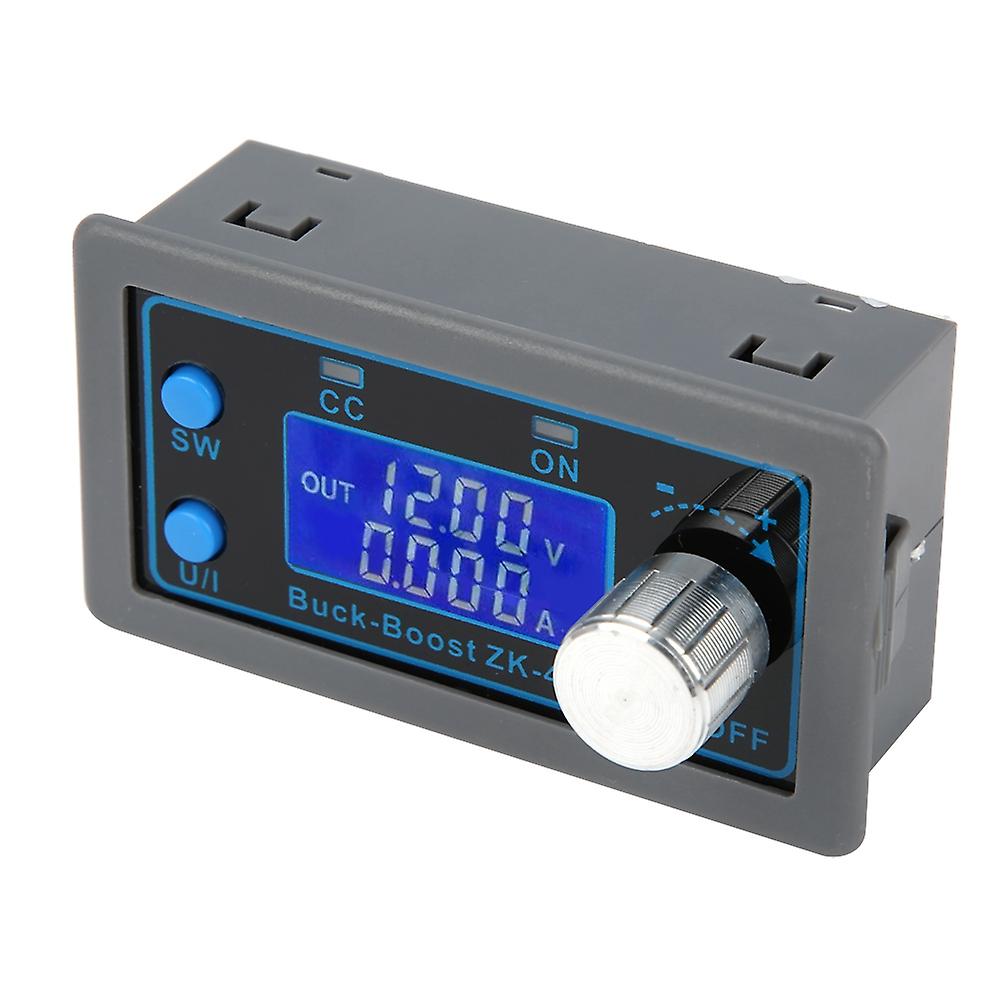
0.530V 4A DC-DC BuckBoost Converter Module, CCCV Voltage Regulator, LCD Display

€ 27,95
KOSTENLOSER Versand

0.530V 4A DC-DC BuckBoost Converter Module, CCCV Voltage Regulator, LCD Display

  • Marke: Unbranded
Verkauft von:
(Premium-Verkäufer)

0.530V 4A DC-DC BuckBoost Converter Module, CCCV Voltage Regulator, LCD Display

  • Marke: Unbranded

€ 27,95

Bespaar € 8,00 (22%)

UVP

€ 35,95
Auf Lager
KOSTENLOSER Versand
Verkauft von:
(Premium-Verkäufer)

€ 27,95

Bespaar € 8,00 (22%)

UVP

€ 35,95
Auf Lager
KOSTENLOSER Versand

Wir akzeptieren die folgenden Zahlungsmethoden

Beschreibung

0.530V 4A DC-DC BuckBoost Converter Module, CCCV Voltage Regulator, LCD Display

Feature: 1. The structure of this product provides a variety of software protection mechanisms that are safer, more reliable and practical. 2. This converter has a large heat dissipation area and can better maintain long‑term operation. 3. The input terminal of this converter module has anti‑reverse protection, which will not burn when reverse connection. 4. The output terminal of this converter module has anti‑backflow protection, no need to install anti‑backflow diode when charging. 5. The numerical control adjustment of this product is accurate and fast. It also has boost and buck functions. The output voltage is adjustable from 0.5‑30V, and the current limit is adjustable from 0‑4A. Specification: Item Type: Converter Module.Input Voltage: 5.0-30V Output Voltage: 0.5-30V Output Current: Work stably for a long time at 3A, up to 4A with enhanced heat dissipation Output Power: Natural heat dissipation 35W, enhanced heat dissipation 50W Voltage Display Resolution: 0.01V Current Display Resolution: 0.001A Conversion Efficiency: about 88% Soft Start: Yes (the module may fail when the high-power load is powered on) Working Frequency: 180KHZ Protection Mechanism: Reverse input, anti-backflow output Input Undervoltage Protection (4.8-30V adjustable, default 4.8V) Output Over-Voltage Protection (0.5-31V adjustable, default 31V) Output Overcurrent Protection (0-4.1A adjustable, default 4.1A) Over Power Protection (0-50W adjustable, default 50W) Over Temperature Protection (80-110-adjustable, default 110) Timeout Protection (0-100h adjustable,off by default) Over-Capacity protection (0-60Ah adjustable, off by default) How to Use: 1. Switch Display Parameters: In the normal interface, short press the SW key to switch the offline display content. Current A, power W, capacity Ah, and time h can be switched. Long press can change the height display content, switch between input voltage input and output voltage output. 2. Set the Output Voltage Value: In the normal interface, short press the U/I button to enter the voltage CC setting interface. A number of the set output voltage is flashing. Rotate the encoder knob to increase or decrease the output voltage. Short press the knob to select the output voltage number to be set. After setting, short press the U/I button twice to return to the normal interface. Otherwise, it will automatically return to the normal interface and will not operate within 10s. 3. Set the Constant Current Value (that is, the maximum output current allowed by the module): In the normal interface, short press the U/I button to enter the voltage constant current setting interface. Short press the U/I button again to switch to the constant value. It can be seen that the constant current value of a certain bit is flickering. Turn the encoder knob to increase or decrease the value. Short press the encoder to select the number of constant current value to be set. After the setting is completed, short press the U/I button to exit the setting interface and return to the normal interface. Otherwise, it will automatically return to the normal interface and will not operate within 10s. 4. By Default, the module is Set to on/off: In the normal interface, press and hold the U/I button to enter the parameter setting interface. It displays OPEN OFF or OPEN ON. OPEN OFF means that the output is shut down by default when the machine is turned on, and OPEN on means that the output is turned on by default when the machine is turned on. Press and hold the spin encoder to switch between these two states. After setting, press and hold the U/I button to return to the normal interface. 5. Set the Protection Parameter on and Threshold: In the normal interface, press and hold the U/I button to enter the parameter setting interface. Short press the SW button until the protection parameter to be set appears.OUP: Overvoltage protection threshold OCP: Overcurrent protection threshold OPP: Overpower protection threshold OAP: Over-capacity protection threshold OHP: Overtime protection threshold OTP: Over temperature protection threshold Package List: 1 x Converter Module
  • Fruugo-ID: 410992966-869763414
  • EAN: 7603816233193

Produktsicherheitsinformationen

Bitte beachten Sie die unten aufgeführten spezifischen Produktsicherheitsinformationen für dieses Produkt

Die folgenden Informationen werden vom unabhängigen Drittanbieter bereitgestellt, der dieses Produkt verkauft.

Produktsicherheitsetiketten

CE Mark
Sicherheitswarnungen: Warning: Please read the product instructions carefully before use to ensure correct use.
Seriennummer: 7603816233193

Lieferung und Rückgaben

Versand innerhalb von 2 Tagen

  • STANDARD: KOSTENLOS - Lieferung zwischen Di. 16 Dezember 2025–Di. 23 Dezember 2025 - KOSTENLOS

Versand von China.

Wir tun unser Bestes, um dafür zu sorgen, dass die von Ihnen bestellten Produkte vollständig und gemäß Ihrer Spezifikationen an Sie geliefert werden. Wenn Sie allerdings eine unvollständige Bestellung oder Artikel erhalten, die sich von den bestellten unterscheiden, oder es einen anderen Grund gibt, warum Sie mit Ihrer Bestellung nicht zufrieden sind, können Sie die gesamte Bestellung oder einzelne darin enthaltenen Produkte zurücksenden und eine vollständige Rückerstattung für die Artikel erhalten. Vollständige Rückgaberichtlinie ansehen

Details zur Produktkonformität

Bitte beachten Sie die unten aufgeführten Konformitätsinformationen zu diesem Produkt.

Die folgenden Informationen werden vom unabhängigen Drittanbieter bereitgestellt, der dieses Produkt verkauft.

Hersteller:
Es folgen die Kontaktdaten für den Hersteller des jeweiligen Produkts, das auf Fruugo verkauft wird.

  • Wuhan Jinxingkai Network Technology Co., Ltd.
  • Wuhan Jinxingkai Network Technology Co., Ltd.
  • No. 1-1, Door 57
  • Shihua Village
  • Qingshan District
  • Wuhan
  • CN
  • 430000
  • goldxinks@163.com
  • 0086 17786498762
  • https://shop01473o1711614.1688.com/page/creditdetail.htm?spm=a261y.7663282.shopNavigation.1.6310755czE9SFQ

Verantwortliche Person in der EU:
Es folgen die Kontaktinformationen für die verantwortliche Person in der EU. Die verantwortliche Person ist der benannte Wirtschaftsteilnehmer mit Sitz in der EU und verantwortlich für die Compliance-Verpflichtungen in Verbindung mit dem jeweiligen Produkt, das in die Europäische Union verkauft wird.

  • None
  • Kequ Technology s.r.o.
  • Pražákova 1008/69
  • Štýřice
  • Jihomoravský kraj
  • Brno
  • CZ
  • 63900
  • christopher25106@outlook.com
  • 420608214795